
1. Overview
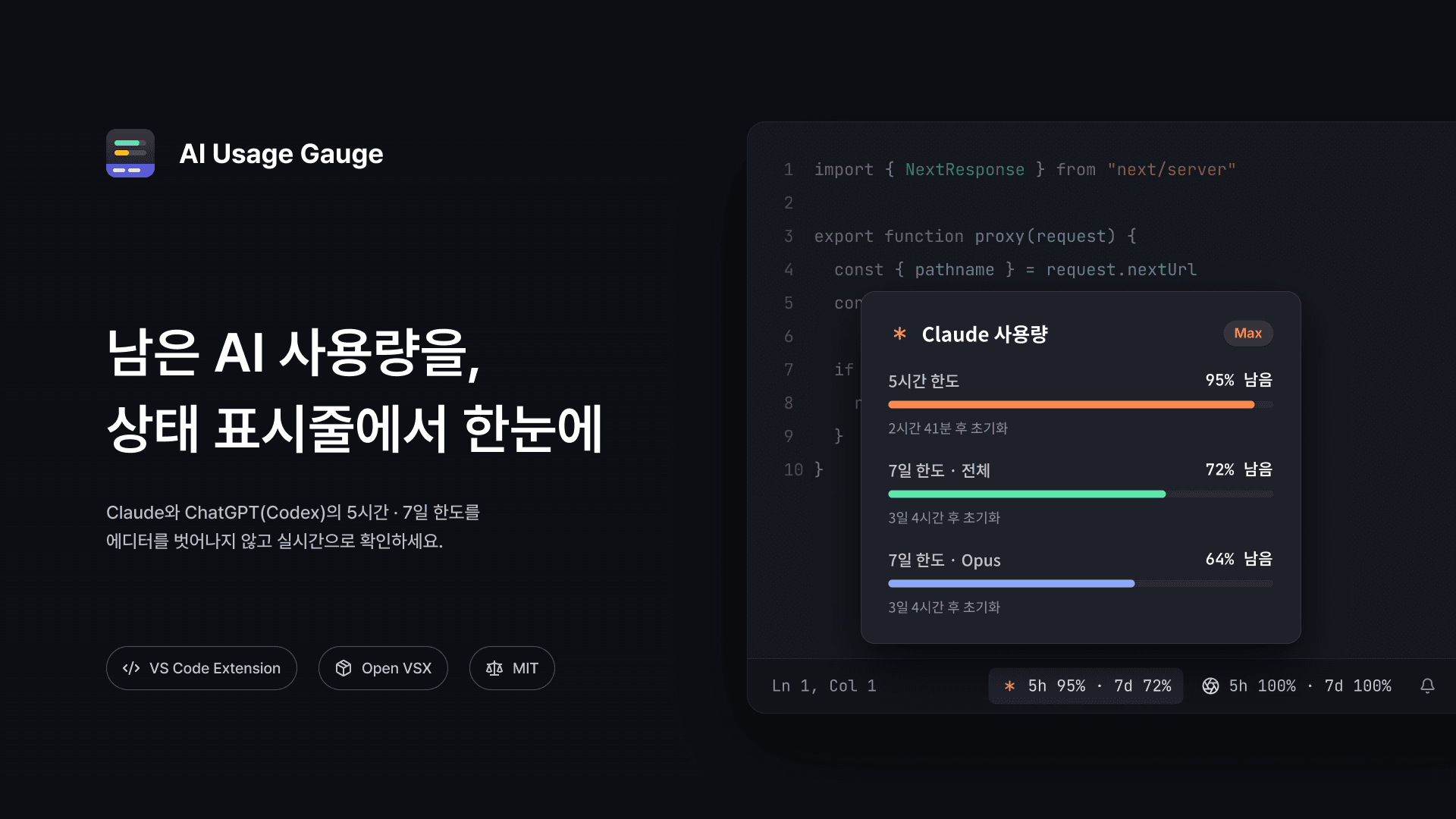
This project is an extension that shows how much of your Claude and ChatGPT (Codex) usage limits is left, right in the VS Code status bar.
Claude Code and Codex both have a 5-hour limit and a weekly limit, so when using the two tools together, I found myself checking how much was left on each quite often. But to do that, I had to leave the editor and check each service's usage page or CLI command separately.
So I put the remaining usage of both services side by side at the right end of the status bar, where it can be seen at a glance while writing code. Usage is shown as what's left rather than what's used, and the extension reuses your existing Claude Code and Codex CLI logins with no extra sign-in.
| You see | Meaning |
|---|---|
5h 78% | 78% of the 5-hour limit is left |
7d 55% | 55% of the weekly limit is left |
| Warning icon and background | A limit shown is at 25% or less |
| Error icon and background | A limit shown is at 10% or less, or used up |
Hovering over an item shows a tooltip with every limit, including per-model weekly limits such as Opus and Sonnet, along with the time left until each resets and your plan. The UI supports English and Korean, following VS Code's display language.
I published the extension to Open VSX as well as the VS Code Marketplace, so it can also be installed in other VS Code-based editors that use Open VSX.
2. System Architecture
I built this project with JavaScript and the VS Code Extension API, as a single extension.js file with no runtime dependencies or bundler. It runs entirely on the user's machine with no server of its own, and collects no telemetry.
Claude usage is fetched by querying the Anthropic usage API with the login token Claude Code has stored. The token is looked up in the macOS Keychain first, then read from ~/.claude/.credentials.json if not found there, and is sent only to api.anthropic.com — never shown, logged, or cached.
Even when the token has expired, the extension doesn't refresh it itself. Refreshing it from the extension would rotate Claude Code's refresh token and could sign Claude Code out, so I left refreshing to Claude Code and had the tooltip prompt the user to run claude once instead.
ChatGPT usage is fetched by running the installed codex app-server as a child process and exchanging JSON-RPC messages with it over standard I/O. The Codex CLI handles authentication, so the extension never reads the OpenAI token itself.
const messages = [
  {
    id: 0,
    method: "initialize",
    params: { clientInfo: { name: "ai_usage_statusbar", version: "0.1" } },
  },
  { method: "initialized" },
  ...Object.entries(calls).map(([id, [method, params]]) =>
    params === null
      ? { id: Number(id), method }
      : { id: Number(id), method, params },
  ),
];
child.stdin.write(messages.map((m) => JSON.stringify(m) + "\n").join(""));
VS Code launched from the Dock may not inherit the shell's PATH and fail to find codex, so I appended common install locations such as Homebrew, pnpm, Bun, and Volta to the search path, and added an aiUsage.codexPath setting to specify it directly.
Since the two services return different response formats, I converted each limit into a common shape holding its name, a short label for the status bar, the usage percentage, and the reset time, and displayed both the same way. If the Claude response includes a limit the extension doesn't know about, its key is used as the label and shown in the tooltip, so new limits show up without updating the extension.
VS Code runs the extension separately in every open window, so with several windows open, the same API would be called once per window. To prevent this, I wrote results to a cache file in the extension's global storage, so other windows reuse a result from within the refresh interval instead of calling the API again.
const cache = await readCache(cacheFile);
const maxAge = intervalMs() - 5000;
const enabled = SOURCES.filter((s) => config().get(s.setting, true));
await Promise.all(
  enabled.map(async (source) => {
    const cached = cache[source.id];
    if (!force && cached && Date.now() - cached.at < maxAge) {
      results[source.id] = cached;
      return;
    }
    results[source.id] = cache[source.id] = await load(source);
  }),
);
await writeCache(cacheFile, cache);
Usage is checked every 2 minutes by default, and the tooltip's time left is updated every 30 seconds, with an immediate re-check once a limit's reset time has passed.
Beyond that, I turned the Claude and ChatGPT logos into an icon font (woff) and registered them as status bar icons, and set the two items' priorities to -1000 and -1000.001 so they stay at the right end of the status bar with no other extension's item slipping in between. And since only the logo is visible in the status bar, I set a separate accessibility label so screen readers also read out the service name.
3. Retrospective
Since this extension borrows other tools' login credentials, deciding what the extension would not do mattered more than adding features.
I designed it to work only within limits that leave the original tools untouched — it doesn't store tokens, doesn't refresh expired tokens itself, and leaves Codex authentication to the CLI. It taught me that when building a service that handles users' credentials, you need to decide what it must not do before what it can do.
Finally, publishing the extension to the VS Code Marketplace and Open VSX meant preparing localization bundles, a marketplace listing, a changelog, and troubleshooting guides on top of the features themselves. Accounting for things that differ across users' environments — like VS Code launched from the Dock not seeing the shell's PATH — taught me that building a tool other people install and use includes everything that comes after the features are done.