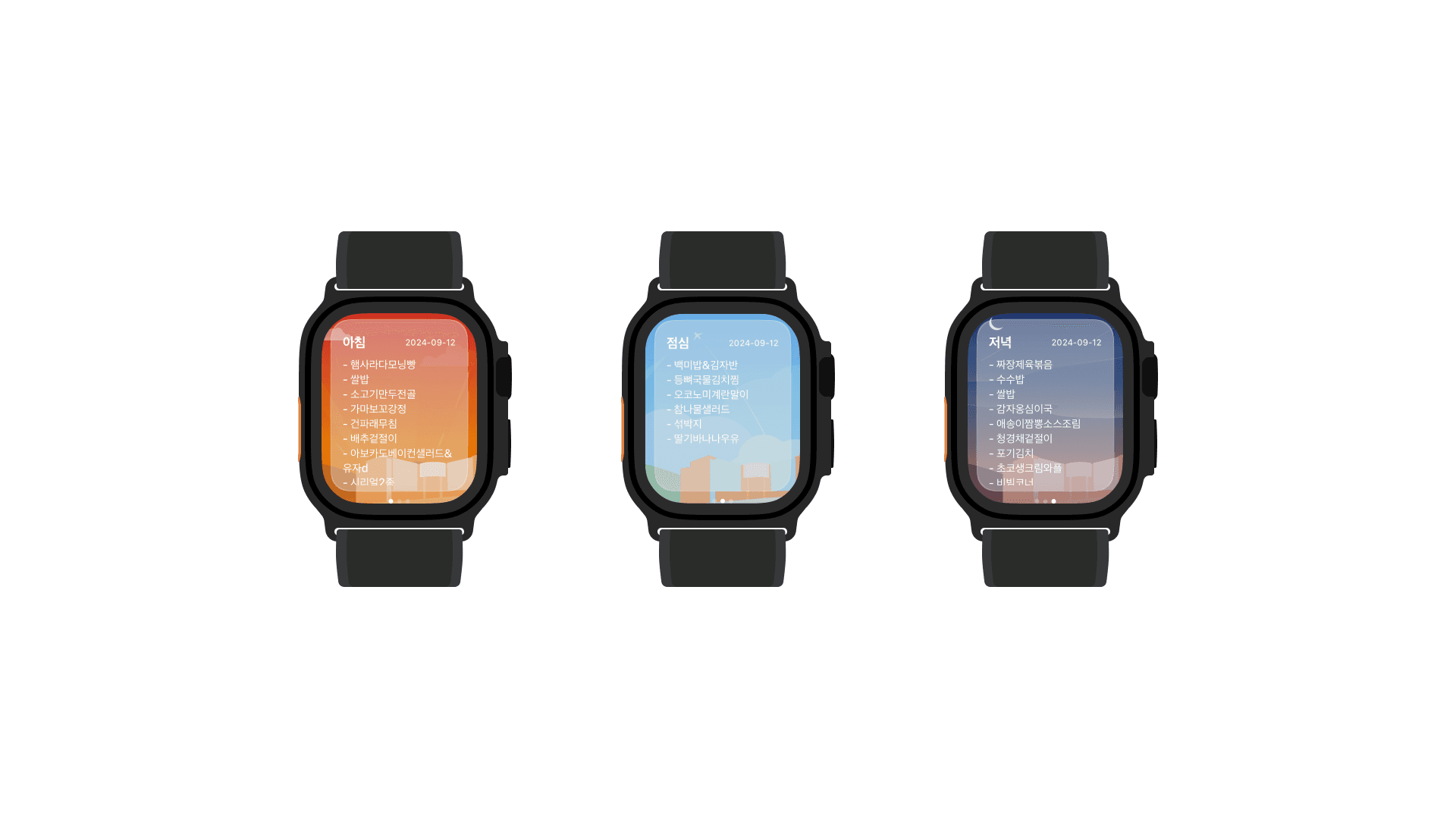
This project is a separate, independent project built by referencing the web page and iOS app of DIMIGO Meal.
1. Overview
While continuing to build projects with React Native, I figured that having experience developing apps in a native language would be a big help for my future React Native work.
That's what got me thinking about building an app in Swift, and I thought it would be nice to build something I could use on the Apple Watch I wore every day.
I thought about what kind of app would work well on the Apple Watch, and decided to build a meal menu lookup app, since it was one of the apps I used most often on a daily basis at the time.
Korea Digital Media High School had a service for checking the school meal menu called DIMIGO Meal, available as a website and an iOS app.
I figured that offering it as an Apple Watch app too would make it more useful — especially since a lot of students at my school wore Apple Watches — and would make things more convenient for students, so I built it.
2. System Architecture
To fetch the meal data that mattered most for this project, I used the DIMIGO Meal API provided by DIMIGO Meal.
Sending a request in the form https://api.디미고급식.com/meal/YYYY-MM-DD returns a response like the following:
{
  "breakfast": "Mini shrimp burger/rice/soft tofu stew/Vienna sausage in ketchup sauce/stir-fried perilla leaf greens/kimchi/mango green salad/crunch oats, corn flakes/milk, low-fat milk, lactose-free milk, soy milk, Actibio probiotic drink (choice of 1)/vitamin C",
  "date": "2025-04-15",
  "dinner": "Corn cheese tteokgalbi oven bake/perilla oil aged-kimchi gondre rice/rice/beef radish soup/spicy shredded pollock with green onion/roasted laver with seasoning sauce/gat kimchi/sujeonggwa/banana/salad bar/bibim corner/smoked duck salad with sweet potato/braised chicken breast/seonsik",
  "lunch": "Fish cake soup/rice/rosé boneless braised chicken/fried glass noodle dumplings & fried sweet potato/stir-fried garlic scapes and mushrooms/napa cabbage salad/topping yogurt"
}
I displayed this response using Swift UI.
func fetchMeal() {
        let formattedDate = formatDateToYYYYMMDD(date: date)
        guard let url = URL(string: "https://api.xn--299a1v27nvthhjj.com/meal/\(formattedDate)") else {
            print("Invalid request")
            return
        }

        isLoading = true

        URLSession.shared.dataTask(with: url) { data, response, error in
            if let data = data {
                do {
                    let decodedData = try JSONDecoder().decode(MealData.self, from: data)
                    DispatchQueue.main.async {
                        self.meal = decodedData
                        self.isLoading = false
                    }
                } catch {
                    print("JSON decoding failed: \(error.localizedDescription)")
                    DispatchQueue.main.async {
                        self.isLoading = false
                    }
                }
            } else if let error = error {
                print("Error: \(error.localizedDescription)")
                DispatchQueue.main.async {
                    self.isLoading = false
                }
            }
        }.resume()
    }
}
3. Retrospective
I didn't know much Swift or Swift UI at the time, so I had to learn everything from scratch. In whatever spare time I had, I went through Swift documentation and various courses to pick up the new language and framework, and along the way I also broadened my understanding of the iOS development ecosystem.
When picking a project topic, I wanted something where I could actually apply what I'd learned while also having practical value as a product, and I think this project fit that goal well.
Friends who wore an Apple Watch actually responded to it really well.
That said, the Apple Developer Program fee was a bit much for a high schooler to bear, and I ran into an issue where removing the time display to improve the visibility of the menu became a blocker — I regret that it never actually shipped.
I hadn't known beforehand that Apple Watch apps are required to always show the time at the top, and accounting for that would have needed a new design.